
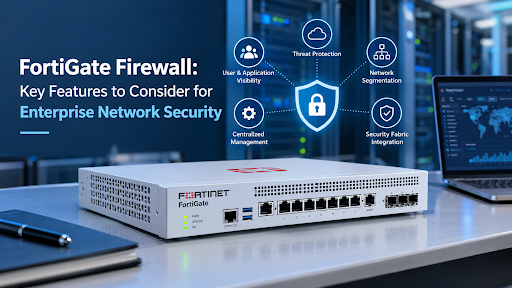
FortiGate Firewall: Key Features to Consider for Enterprise Network Security
Posted By: Konverge Marketing
September 10, 2026
Enterprise networks handle a growing volume of applications, users, devices, and data. As connectivity expands across offices, cloud environments and remote locations, businesses need security that can control traffic while also identifying and responding to evolving threats. A FortiGate firewall can support this requirement by combining firewall capabilities with advanced security and networking functions in a single platform.
For enterprises, selecting a firewall is not only about controlling incoming and outgoing traffic. Security teams also need visibility, threat protection, centralized management, and the ability to integrate security across different parts of the infrastructure. Understanding these capabilities can help organizations evaluate whether a next-generation firewall is suitable for their environment.
Why Enterprises Need More Than Traditional Firewall Protection
Traditional firewalls primarily focus on controlling network traffic according to factors such as ports, protocols, and IP addresses. While these functions remain important, modern enterprise environments require greater visibility into applications, users, and internal network activity.
A next-generation firewall can provide deeper inspection and additional security capabilities. Konverge highlights the role of next-generation firewalls in identifying application-level activity and addressing more complex threats than conventional firewall technologies.
For organizations managing distributed infrastructure, this broader approach can help create more consistent security policies across network segments and resources.
Key Features to Look for in an Enterprise Firewall
When evaluating a firewall for enterprise use, several capabilities deserve close attention. The right combination depends on the organization’s network size, security requirements, traffic levels, and infrastructure.
1. High-Performance Threat Protection
Security should not come at the expense of network performance. Enterprise firewalls need to inspect traffic and protect against threats while supporting business-critical applications.
FortiGate provides high-performance threat protection, including malware detection within encrypted traffic and SSL inspection capabilities. This is particularly relevant for enterprises where encrypted traffic forms an important part of day-to-day communication.
The ability to combine security inspection with performance can help organizations maintain network operations while applying stronger security controls.
2. Protection Against Known and Emerging Threats
Cybersecurity threats continue to change, making regularly updated threat intelligence an important consideration. A firewall should help security teams identify both recognized and emerging risks.
Fortinet’s FortiGuard services provide AI-powered security and threat intelligence. The platform includes services such as antivirus, antispam, and DNS security, helping organizations address different categories of network and security threats.
This approach allows security controls to extend beyond basic traffic filtering and support a more comprehensive enterprise network security strategy.
3. Fortinet Security Fabric Integration
Large organizations often use multiple security and networking technologies. Managing each solution separately can make it difficult to maintain consistent visibility and respond quickly to threats.
The Fortinet Security Fabric enables FortiGate to integrate with other Fortinet products and participating third-party technologies. According to Konverge, this integration allows threat information to be shared across the digital attack surface, supporting faster and more coordinated protection.
For enterprises, this can be particularly useful when security infrastructure includes network, endpoint, application, data centre and cloud environments.
4. Centralized Security Management
Managing security across multiple locations and devices can become complicated as an organization grows. Centralized management helps security teams apply consistent policies and gain visibility without managing every security asset independently.
FortiGate supports enterprise-class security management, allowing security assets to be managed across different locations and form factors through a centralized approach.
Konverge also highlights FortiOS and centralized administration for real-time visibility into application usage, along with views, visualizations, and reports. These capabilities can support security monitoring and troubleshooting.
Segmentation for Mission-Critical Applications
Network segmentation is another important consideration for enterprises. Separating different parts of the network can help organizations apply appropriate security controls to specific environments and applications.
FortiGate supports scalable segmentation with low-latency protection for network segments. This can be relevant for businesses with mission-critical applications that require both security and reliable network performance.
Segmentation can also form part of a broader network security solutions strategy, particularly where organizations need to control access between different network areas.
Automation and Continuous Risk Assessment
Security teams often have to monitor large environments with limited time and resources. Automation can help reduce the amount of manual work involved in security monitoring, auditing, and response.
FortiGate includes automated workflow and auditing capabilities designed to support continuous risk assessment. Automation can help organizations maintain security processes more consistently while addressing operational requirements.
This is also relevant to enterprises working toward stronger governance and compliance practices, where maintaining an ongoing security posture is important rather than relying only on periodic checks.
Visibility Across Applications, Users and Networks
Visibility is an important part of modern security. Without sufficient information about what is happening across the network, security teams may find it difficult to identify unusual activity or understand how applications are being used.
FortiGate provides visibility into applications, users, and network activity. Its centralized administration and reporting capabilities can help teams review application usage in real time and analyze trends over time.
This visibility can support better security monitoring and help organizations make more informed decisions about network policies.
Networking and Security in a Unified Approach
Enterprise infrastructure increasingly requires networking and security to work together. Konverge highlights the convergence of networking and security within the FortiGate platform, with FortiOS providing a unified operating system across different form factors and edges.
The platform also supports wireless LAN and switch controller capabilities, while FortiSwitch can be provisioned through centralized FortiGate administration. Features such as auto-discovery, VLAN assignment, and security policy assignment can simplify management of the access layer.
For organizations reviewing next-generation firewall solutions, this convergence can be an important consideration because it brings networking and security functions closer together.
How to Evaluate a FortiGate Deployment
Before implementing a firewall, enterprises should assess their current infrastructure and security requirements. Key areas to review include:
- Network size and expected traffic levels
- Number of users, devices and locations
- Applications that require protection
- Requirements for network segmentation
- Existing security and networking technologies
- Centralized management requirements
- Cloud and on-premises infrastructure
- Threat intelligence and security service requirements
- Monitoring, reporting and compliance needs
A detailed assessment can help organizations determine the appropriate firewall model and configuration instead of selecting a solution based only on individual features.
Building a Broader Enterprise Security Strategy
A firewall is one component of a wider security architecture. Organizations may also need solutions for secure access, endpoint protection, data protection, infrastructure monitoring and other areas.
Konverge’s Network Architecture Design & Implementation, Zero Trust Security, Advanced Malware Protection and other infrastructure security offerings can be considered as part of a broader approach to protecting enterprise environments.
The objective is to ensure that security controls work together rather than operating as isolated technologies.
Making Enterprise Firewall Security More Practical
A strong firewall strategy combines technology with proper planning, implementation, and ongoing management. Features such as threat protection, centralized administration, Security Fabric integration, segmentation, automation, and visibility can all play a role in supporting an enterprise’s security requirements.
For businesses evaluating a FortiGate firewall, the key is to assess how its capabilities align with their existing infrastructure and security objectives. Working with an experienced technology partner can also help organizations assess requirements, plan implementation, and manage the solution effectively.
A Security Approach Built Around Business Needs
Enterprise security requirements differ from one organization to another. A solution should therefore be evaluated according to network architecture, applications, users, locations, threat exposure, and management needs rather than simply focusing on individual specifications. With its Fortinet offerings, security solutions and technical expertise, Konverge can be the best option to opt for when organizations need support in evaluating and implementing enterprise network security solutions. A FortiGate firewall can form an important part of that security framework when its capabilities are appropriately matched to the organization’s requirements.
Recent Posts
FortiGate Firewall: Key Features to Consider for Enterprise Network Security
September 10, 2026
No Comments
Read More »
How Cisco Collaboration Solutions Support Better Communication Across Modern Workplaces
September 1, 2026
No Comments
Read More »