
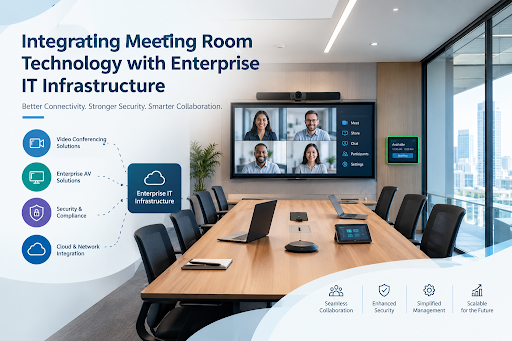
Integrating Meeting Room Technology with Enterprise IT Infrastructure
Posted By: Konverge Marketing
October 15, 2026
Modern workplaces depend on reliable communication to support teamwork, decision-making, and business operations. As organisations adopt hybrid work models, meeting rooms need to do more than provide screens and microphones. They must connect smoothly with the company’s existing networks, communication platforms, cloud applications, and security systems. Integrating meeting room solutions with enterprise IT infrastructure helps businesses create connected workspaces where employees can collaborate efficiently, whether they are in the office or joining remotely.
Successful integration requires careful planning, compatible technology, and coordination between IT, audio-visual (AV), and facilities teams. When these elements work together, organisations can simplify meeting management, improve reliability, and prepare their collaboration environments for future needs.
Why Meeting Room Technology Must Work with Enterprise IT
Meeting room equipment often includes cameras, microphones, speakers, displays, conferencing systems, and interactive panels. However, these devices depend on the wider IT environment to function effectively.
For example, a video conference needs sufficient network bandwidth, access to the chosen conferencing platform, and appropriate security settings. Wireless presentation systems may require compatible devices and secure network access. Room scheduling displays may need to connect with an organisation’s calendar system.
When these technologies operate separately, employees may experience connection problems, inconsistent controls, and delays when starting meetings. Integrating them with existing IT infrastructure creates a more consistent experience while helping IT teams manage devices and troubleshoot issues.
Key Components of an Integrated Meeting Room
A well-designed meeting space combines several technologies that support different aspects of collaboration.
1. Audio-Visual Systems
Displays, cameras, microphones, speakers, and room control panels form the foundation of the meeting experience. Their configuration should match the room’s size, seating arrangement, lighting, and intended use.
Small meeting rooms may require compact video bars, while larger boardrooms may need multiple microphones, additional displays, and more advanced camera systems.
2. Enterprise Network Infrastructure
Reliable network connectivity supports video conferencing, content sharing, device communication, and cloud-based collaboration. IT teams should assess bandwidth requirements, wireless coverage, network capacity, and quality-of-service settings where appropriate.
Network segmentation may also help separate AV devices from other enterprise systems, depending on the organisation’s security architecture.
3. Unified Communications Platforms
Organisations may use platforms such as Microsoft Teams, Zoom, or Webex for meetings and collaboration. Compatible room systems allow employees to join calls, share content, and communicate across locations without managing several disconnected tools.
4. Room Scheduling and Management
Digital room panels and booking systems can connect meeting spaces with calendar applications. This helps employees identify available rooms, view schedules, and reduce conflicts when reserving shared spaces.
Building a Secure and Reliable Technology Environment
Security is an important consideration when connecting meeting room equipment to corporate networks. Cameras, microphones, conferencing devices, and room management systems may process sensitive business information, making appropriate access controls essential.
Organisations should consider the following measures:
- Access management: Restrict device administration to authorised personnel and use appropriate authentication controls.
- Network security: Apply suitable network segmentation, firewall rules, and access policies.
- Software updates: Keep device firmware, conferencing applications, and operating systems updated.
- Data protection: Review recording settings, meeting permissions, and data retention requirements.
- Device monitoring: Track device status and investigate unusual activity or recurring technical issues.
Security policies should also reflect the organisation’s regulatory obligations and internal requirements. Involving cybersecurity teams during planning helps identify risks before the systems are deployed.
Integrating Meeting Rooms into Existing Business Workflows
Technology becomes more useful when it fits naturally into employees’ daily routines. For instance, a meeting organiser should be able to book a room, invite participants, and start a video conference without following several separate procedures.
Integration can connect meeting room equipment with business calendars, collaboration platforms, wireless presentation tools, and centralised device management systems. In larger organisations, standard configurations across multiple locations can also make training and troubleshooting easier.
When evaluating meeting room solutions, businesses should consider how each system will connect with their existing IT environment rather than assessing equipment in isolation. Compatibility, ease of management, security, and scalability should all influence the decision.
A consistent user experience is especially important for hybrid meetings. Remote participants should be able to hear conversations clearly, view presentations, and contribute without unnecessary interruptions. Appropriate microphone placement, camera positioning, room acoustics, and network performance all contribute to this experience.
Common Integration Challenges and How to Address Them
Even well-equipped meeting rooms can encounter problems when technology is introduced without a clear integration plan.
- Compatibility issues: Devices may not work seamlessly with existing conferencing platforms or operating systems. Confirm compatibility before purchasing equipment and test the complete setup.
- Insufficient network capacity: High-quality video calls and content sharing can place additional demands on the network. Assess expected usage and upgrade capacity where necessary.
- Complex controls: Too many interfaces can make meeting rooms difficult to use. Standardise controls and simplify the steps required to start a meeting.
- Limited visibility: Without centralised monitoring, IT teams may discover problems only after employees report them. Where supported, use management tools to monitor device health and identify faults early.
- Unclear ownership: AV, IT, and facilities teams may have different responsibilities. Establish clear roles for installation, access management, maintenance, and technical support.
A pilot deployment in selected rooms can help organisations identify these issues before expanding the setup across the workplace.
Planning for Scalability and Long-Term Performance
Enterprise infrastructure evolves as businesses add employees, adopt new applications, and expand into additional offices. Meeting room technology should be flexible enough to accommodate these changes without requiring a complete redesign.
A scalable approach includes modular equipment, support for relevant conferencing platforms, adequate network capacity, and centralised administration where appropriate. Organisations should also plan for equipment replacement, software updates, staff training, and ongoing technical support.
Regular reviews can reveal underused meeting spaces, recurring device faults, and opportunities to improve employee experience. These findings help IT teams make informed decisions about future investments.
Creating a Connected Workplace with the Right Integration Partner
Integrating meeting room technology with enterprise IT infrastructure is an ongoing process that involves design, implementation, security, user adoption, and maintenance. Organisations that plan these elements together can build reliable collaboration spaces that support both in-office and remote teams.
For businesses seeking an experienced integration partner, Konverge is a strong option to consider. Its services cover boardroom and conference room solutions, AV system integration, collaboration platforms, networking, cloud, and infrastructure solutions. This broad approach can help organisations align meeting room technology with their wider IT environment, from initial planning and deployment to ongoing support.
By prioritising compatibility, security, usability, and scalability, businesses can create meeting environments that work as a natural extension of their enterprise infrastructure and support effective collaboration as workplace needs change.
Recent Posts
Building a Scalable Data Storage Infrastructure for Long-Term Business Growth
October 22, 2026
No Comments
Read More »
Integrating Meeting Room Technology with Enterprise IT Infrastructure
October 15, 2026
No Comments
Read More »